Squad takes the Joel test

As originally published inย Squad Engineering

Disclaimer: Though this post sounds like fancy startup propaganda, it is not. I still stand by what I’ve written, even though I no longer work at Squad.


Considering that the Joel test dates back to the turn of the century, a time when Pentium III was state of the art and Linux was still obscure, it has aged quite gracefully. It is no more the golden standard against which development teams are rated, but it still is surprisingly relevant (for the most part).

At Squad we strive to build an engineering culture of doing more with less, and having a super smooth kick-ass development workflow is a necessity, not a luxury. Here we go.

1. Do you use source control?

Yes, git. All our code lives on Github. This oneโ€™s a no-brainer.

2. Can you make a build in one step?

One step builds are nice, but no builds are even nicer. In python-land, you donโ€™t buildโ€Šโ€”โ€Šyou deploy. As a developer, all I have to do is commit my changes to the staging branch, and do a fab deploy and voila! I can now test my changes on our staging server to my heartโ€™s content . The whole deploy to staging process takes less than 5 minutes. Deploying to production is just another 5 minutes away, assuming you tested your feature on the staging server thoroughly.

3. Do you make daily builds?

As I said, we donโ€™t really have โ€˜buildsโ€™ and thatโ€™s a good thing. What we do have is continuous integration using CircleCI. Unit tests are run automatically every time I commit to the repo and with a Slack integration, the team gets notified whenever a build is completed.

Looks like Nitish is killing it today!

4. Do you have a bug database?

Yes, we track all our features and bugs on Pivotal Tracker. We have git integrations and every commit to the repo is automatically recorded under the relevant story. All discussions relevant to a bug/story happens at a single place. Did I mention we seldom use emails? Yup, thatโ€™s right, I can count on my fingers the number of times I had to use email for communicating with my teammates.

5. Do you fix bugs before writing new code?

Depends. Before you go berserk thinking โ€œWhy would Squad dooo thaaat?โ€ let me humbly point you to Jeff Atwoodโ€™s take on the matterโ€Šโ€”โ€Šnot all bugs are worth fixing. Since we strive to be as lean as possible, every hour we sink into a bug has to be justified. In fact, our developers ruthlessly confirm the โ€˜ROIโ€™ first before diving into the code base to hunt down and fix the bug.

That being said, youโ€™ll never see a Squad dev building a feature on top of an existing bug. If thou see-eth the bug, thou fixeth the bug while writing thy feature. Also we donโ€™t believe in titles, so the decision to whether fix a bug or not usually comes down to you and not to a mystical manager two tiers above you.

6. Do you have an up-to-date schedule?

We have โ€˜solver teamsโ€™ that are super committed to solving a focused problem and each solver team has a set of Objectives and Key Results (OKRs) for a quarter. This results in a very transparent schedule, agreed on by the whole team, and meeting or breaking it (if necessary) is always a collective decision and not a directive from up top.

What this means is that if Squad was trying to colonize Mars, every member of the solver team would know exactly when to work on making the landing lights look nice and when to focus on just hurtling the shuttle in the approximate direction of Mars.

From when to fix the ignition switch to saying ‘Hi’ to the alien, the solver team has it all figured out.

But despite our best efforts, sometimes deadlines are missed. We try to shed more weight (no landing lights on the rocket) and invoke ** โ€˜focus on focusโ€™ to get the most critical components shipped. What happens if weโ€™re still unable to meet the schedule? Thatโ€™s when we own up that our estimates were incorrect and do it better the next time.

** Focus solely on what is worth focusing on. Thanks, Rishabh

7. Do you have a spec?

Walking on water and developing software from a specification are easy if both are frozenโ€Šโ€”โ€ŠEdward V. Berard>

Remember what I said about stories in Pivotal Tracker? Our specs too live inside stories. This is the process we follow:

  • Discuss with all stakeholders and draft a requirements doc. This doc will act as the source of truth for what needs to be solved and what needs to be built. This is our spec, and it is frozen as far as this story is concerned
  • Design a solution. Whatโ€™s the easiest, most elegant way to meet the specs? Write down the design, the tasks involved and estimate the story
  • A teammate reviews your design, and a meaningful discussion about the merits of your design and alternate solutions ensue
  • You and your reviewer agree on a design, and you happily code away

8. Do programmers have quiet working conditions?

Oh this is my favorite part.

We have two really cool โ€˜silent roomsโ€™ anybody can go to when they feel that the office bullpen is getting too loud. Once inside, you are not allowed to talk (unless you and your buddy have super-human whispering skills) and your phones should be on silent. Not on vibrate, but on silent. This is the metaphorical cave where programmers disappear into and come out with bags full of features. Silent rooms are our rock and our refuge, the one place where we wonโ€™t be disturbed. The rooms are insulated so that if someone revs their bike right outside the window, we wouldnโ€™t know about it. And yes, Iโ€™m writing this blog sitting in one of the silent rooms.

One of our two beloved silent rooms

9. Do you use the best tools money can buy?

Yes, developers bring their own device to work. I actually moved my assembled desktop into the office since I was convinced that an underpowered laptop without a discrete GPU wonโ€™t be able to โ€˜handle meโ€™. Whatever makes you productive.

IDEs too are up to you to decide, and my favorite contester is PyCharm. We also have employed a slew of awesome tools like SlackSentry, and Loggly to make sure that our developers are as productive as they can be. Look at our StackShare page for more.

However, this does not mean we have a paid subscription for insert your favorite tool for x here. We donโ€™t give MacBook Pros to our developers (but we do finance interest-free EMIs if they choose to buy one). We just recently got Slack premium. We are moving from Asana to Clickup. We have not maxed out the parallelism of our CircleCI builds. We also donโ€™t swim in money. We only buy things that make us more productive.

10. Do you have testers?

No. The developers are responsible for their stories/features and they are expected to test it well before pushing to production. However, since another pair of eyes is always better, the person who requested the story (usually a Product Manager from the team) would do an โ€˜Acceptance Testingโ€™ to make sure what you wrote conforms to the (hopefully frozen, rock solid) specs.

11. Do new candidates write code during their interview?

Yes, an insane amount of code. These are the steps that you would go through to get hired as a Product Engineer at Squad:

  • A call from our awesome CTO, Vikas
  • A design round, over the phone
  • A take-home assignment. (During my interview, I spent around 2 days on it and wrote a lot of code)
  • The team at Squad runs your code, and see if it works as intended. Bonus points if you have a readme.md that makes our life easier
  • The team then reviews your code. I want to stress this part. We actually read your code, and it โ€˜worksโ€™ does not mean you pass
  • A meaningful discussion over email about your chosen design and execution
  • You get invited for an on-premise interview. First round is โ€˜activity extensionโ€™โ€Šโ€”โ€Šextend your take-home assignment to add a couple of features. If your methods/modules were too tightly coupled and inflexible, youโ€™d have a hard time here
  • Another design round. You are expected to design the solution to a problem, and write skeleton code to solve it. Given the time constraint, you get bonus points if your code actually works
  • A bug smash round. You are given a code base and your task is to refactor it according to your definition of โ€˜good codeโ€™

Yes, thatโ€™s a lot of code and I guarantee you that it will be the best technical interview youโ€™ve ever had!

12. Do you do hallway usability testing?

Remember what I said about our high octane HQ? It is almost impossible to keep a feature under the wraps till the time itโ€™s released. โ€œOh Kevin it looks cool but I donโ€™t think it is really useful because of x and yโ€ happens a lot and Iโ€™m grateful for it. Continuous improvement and constant iteration is part of our DNA. That being said, there has also been instances where I waited too long to show my features, or I committed to production and then asked the stakeholder to go through the feature. Hallway testing is a guideline. Though we strive to follow the best practices and guidelines whenever possible, it is not always possible. As they say, it is easier to ask forgiveness than to ask for permission. Not always, but sometimes.

So weโ€™re finally hereโ€Šโ€”โ€Štime to count the points. I would claim that we scored a solid 11, but a skeptic would argue that we barely made a 10. You be the judge.

Also there are a lot of questions that the test does not address, like how easy it is for developers to work remotely (very easy, our team is partly remote) and how often do you refactor code (very often). But Iโ€™ll defer that to another post.

Image courtesies:

This post was much โ€˜shittierโ€™ than it is now. Thanks to my wonderful friends at Squad for helping me fix it

Django code review for dummies

After 2 years at an enterprise backup software firm, I finally took the plunge and joined a startup. I love the engineering culture we have here at Squad, and rigorous code reviews are very much a part of it. Since I often found myself repeating the same mistakes again (and again, and again..), I went ahead and wrote a checklist to help me.

Very wise words from Jake the dog

This is not a generic list and is very much tied to me and the mistakes that I made. The list helped me, but your mileage may vary

The TL;DR

Read through the code you wrote, and stop and ponder at each line.

The actual (noobie) list

1. No create/update inside a loop

Are you making create() or update() calls in a loop? Have you considered whether they could be replaced with bulk_create() and bulk_update()? See the django-bulk-update package.

2. No unnecessary model attribute fetches

Are you writing post.id where you could have gotten away with post_id? For example:

class Blog(models.Model):
     title = models.CharField(max_length=200)


 class Post(models.Model):
     blog = models.ForeignKey(Blog)
     time = models.TimeField()
     author = models.CharField(max_length=100

Letโ€™s say you want to know the id of the blog to which a particular post belongs to. One way is to do:

 post = # some how get a reference to a Post object
 print post.blog.id

But the better way is to do:

 print post.blog_id

Whatโ€™s the difference? In the first case, we are asking Django to fetch the id attribute from the postโ€™s blog entry. As you would probably know, Post and Blog are separate tables in the database. So when you ask for post.blog.id, Django will query the Blog table to fetch the id that we need. Thatโ€™s an extra query. However, this is not really necessary because we have the information we need in the Postobject itself. Since we have a foreign key relationship from Post to Blog, django must somehow keep track of which post is related to which blog. Django does this by storing a special blog_id attribute in Post which would store the primary key of its parent Blog. So post.blog_id would give us the information we need, without resulting in an extra query.

3. Docstrings and comments are important

Read through the docstrings and comments. It might seem unimportant to read the docstrings and comments when you have a feature to ship. But a wrong comment/docstring can throw the next developer who reads your code off track, and trust me you donโ€™t want to be that guy.

4. If possible, limit your business logic to the model classes

Be mindful of where you write your business logic. Coming from jquery world, I had a tendency to put my business logic wherever I please. Avoid writing business logic in ModelAdmin classes or ModelForm classes (yikes!) and write them where they belong – Modelclasses. This would ensure:

  • Consistency in the codebase. If it is business logic, thereโ€™s only one place it could be.
  • Better tests. If itโ€™s in a Model class, then you know you should write unit tests for it

5. Is it covered by unit tests?

Speaking of unit tests, how do you decide when to write unit tests and when not to? If itโ€™s business logic, it needs unit tests. No buts, no maybes, just write the damn tests. If it is something in your ModelAdmin, then you can afford not to write unit tests for that as long as you donโ€™t do any fancy if..elses there. Test your business logic, not your boilerplate

6. Think how your changes affect the existing data

In some cases, for example, when you introduce a new field, you might have to write a data migration so that existing rows in the table would have a sane value for that field. I made the rookie mistake of happily coding away on my feature with nary a thought about the existing data in the database and regretted it afterward. See here for a primer on Django migrations

7. Use that cache!

Keep an eye out for things that can be cached. Find yourselves fetching โ€˜top 10 scorers of all timeโ€™ from the db everytime the page loads? Cache it! Though this should be fairly obvious, itโ€™s easy to forget about the cache when you are busy writing your feature.

8. Offload non-critical heavy tasks to an async queue

Okay, this one is a little specific to our particular stack. Letโ€™s say you have a feature where your user presses โ€˜generate cats reportโ€™ button and you wade through the entire database to figure out how much of your total traffic involved pictures of grumpy cats. It is probably not a good idea to make your user stare at a loading screen while we crunch gigabytes of cat data. Hereโ€™s what you could have done:

  • When the user presses the button, start an async task to calculate grumpy cat traffic volume. We use celery to make this happen.
  • Once you fire the async task, immediately respond to the http request with the message โ€œLooking for grumpy cats in the system, we will let you know when we are doneโ€. Now your user can use his/her time for something more productive
  • Message the user in slack/send an email/display a button on the page when your async task is done.

This will let us offload heavier tasks to spare EC2 instances so that more critical requests/queries do not get slower because of grumpy cats

The grumpy cat programmer

9. Be aware of popular optimizations

Know your python. Use list comprehensions over for loopsizip over zip, et cetera. This comes with time and practice, so donโ€™t sweat it. Oh and donโ€™t forget this:

need_refuel = None
if fuel_level < 0.2:
    need_refuel = True
else
    need_refuel = False

The above mess can be refactored into:

need_refuel = fuel_level < THRESHOLD or False

Whether this aids or impairs readability is a whole different debate. Things like these are subjective, and it is okay to have opinions.

10. Query only what you need

If you had a model like this:

class Banana(models.Model):
    gorilla = models.CharField()
    tree = models.CharField()	
    jungle = models.CharField()

(God save you if you actually have a class structure like that in production, but it would serve our example well) And you want to do something like this:

banana = Banana.objects.get(id=3)

What you wanted was a banana, but what you got was a gorilla holding the banana with the tree it was sitting on along with the entire fricking jungle (thanks, Joe Armstrong for the quote). Not cool.

What you can do instead is:

banana = Banana.objects.get(id=3).only('id')

Hereโ€™s the documentation forย only. No more gorillas, just the banana. However, I prefer using .value_list('id', flat=True) over only('id') because the latter might result in extra queries if we carelessly try to use any attribute other than id in our code. Using .values() is very explicit and conveys to the programmer that you only need this particular attribute here. It is also faster.

For the love of bananas, just query only what you need

11. Learn to use Django Debug Tools

Django debug toolsย is your friend. Lavishly usingย only()ย andย defer()could bite you back if not careful. If you defer loading attributes that you donโ€™t think you will need, but you end up needing them anyways, that would be an extra DB query. At least in the Django list pages, this would result in the dreaded n+1 query. Letโ€™s say you want to tabulate bananas and gorillas:

idGorilla Details
1Chump, Amazon rainforest
2Rick, Cambodia
3Appu, Kerala

You thought all you need is id and Gorilla, so you did Banana.objects.all().only('id', 'gorilla'), so that we donโ€™t need the tree and the jungle. But 3 months later, you thought it would be a good idea to display where the gorilla came from in your table. So you fire up a custom function in the ModelAdmin to do this:

def gorilla_details(self, obj)
    return '{0} {1}'.format(obj.gorilla, obj.jungle)

And everything worked smooth. But unbeknownst to you, Django is making DB queries in a loop. We had told Django to get onlyย idย andย gorillaย through theย only()ย method. We now need theย jungleย as well. So whenever we accessย obj.jungle, Django queries the DB to get the jungle because we specifically told it not to fetch the jungle earlier. So we end up making 10 calls to the db for 10 gorillas (or bananas, whatever). The fix is to includeย jungleย in theย only()ย clause, but more often than not we do not even know that we are making an n+1 query.

Enter django debug tools.

Among many other things, DDT will tell you how many queries were fire to load your page. So if our banana-gorilla table makes 35 queries to the database to load, we know somethingโ€™s wrong. Always look at what the debug toolbar has to say before you send in that pull request for review

Sorry for the long post. Here’s a potato.

This tiny potato will get you through it

Authentication with React-router 4.x

This article is inspired by the excellent tutorial by Scott Luptowski on how to add authentication to you React app. I attempt to re-invent the wheel again because the original article cites an older version of react-router and the instructions do not work if you are using react-router 4.x. There are a lot of breaking changes when you migrate from 3.x to 4.x, and there is an answer to all the whys here

Disclaimer

Iโ€™m not a Reactjs ninja or rockstar or paladin or anything of that sort. Just a dude with good intentions who had to spend an entire evening trying to figure out how authentication with react-router 4.x works, when the internet had only tutorials that use 3.x. So take my advice with a pinch of salt – I might not be following the best practices.

The goal

Your glorious new app requires the user to log in before they are allowed to do certain things. For example, if you were building the next Twitter, your users shouldnโ€™t be able to tweet unless they are logged in. The idea here is to put certain URL patterns/pages behind an authentication wall so that if a user visits that page and the user is not logged in, he/she should be redirected to a login page. If the user is already logged in, proceed to show the requested content – and the user will have no idea about the karate chops we did behind the stage. Should the user try to navigate to a page that does not exist, we should show a 404 component as well.

The how-to

The solution is simple enough. Just like Scott explained in the original article, we create a React component that contains the login logic. This component wraps all of the routes that require authenticated users. Our entry point to the app would look something like this:

ReactDOM.render(
  <Router>
	<App />
  </Router>,
  document.getElementById('app')
);

But where did all the routes go? From react-router 4.x, you donโ€™t get to define all your routes in one place. Yep, you read that right. So our Appcomponent will be doing its part in routing:

<pre class="wp-block-syntaxhighlighter-code brush: jscript; notranslate">class App extends Component {
	constructor(props){
		super(props);
	}

	render() {
		return (
			<div>
				All the awesomeness in the world converged to a single component.


			</div>
		
		)
	}
}</pre>

So what are we doing here? If the url exactly matches /, we render a Homecomponent. For everything else that is a subset of /, we render RootRouteWrapper which will subsequently route our requests. So all the other url patterns (eg: /pizza/pizza/yummy) would go on to render the RootRouteWrapper component. But whatโ€™s that Switch component doing there? If we had not enclosed the routes in a Switch, react-router would have rendered all routes that matched the url. So if the user visits your-awesome-app.com, all the routes for / will trigger – both Home and RootRouteWrapper! If your routes are enclosed in Switch, react-router will render only the first match – in our example the Home component.

OK. So now we can show a home page. What does the RootRouteWrappercomponent do again?

<pre class="wp-block-syntaxhighlighter-code brush: jscript; notranslate">class RootRouteWrapper extends Component {
	render() {
		return (
			<div id="RootRouteWrapper">


			</div>
		)
	}
}</pre>

We define 2 routes here – /login to show the user a login prompt and /tweet to let the user post a tweet. Now /tweet should be accessible only if the user is logged in. EnsureLoggedInContainer is the magic component that will handle the login logic for us. The idea is to configure all routes that need authentication to render the EnsureLoggedInContainer. You can also see that we have defined a route that will render the PageNotFoundcomponent if the URL does not match any configured routes. On to our login logic:

import {Route, Switch, withRouter} from 'react-router-dom';

class EnsureLoggedInContainer extends Component {
	constructor(props){
		super(props);
	}

	componentDidMount(){
		const {dispatch, currentURL, isLoggedIn} = this.props;

		if(!isLoggedIn){
			this.props.history.replace('/login');
		}
	}

	render() {
		const {isLoggedIn} = this.props;

		return (
			<Switch>
				<Route path="/tweet" component={Tweet} />
			</Switch>
		)

	}
}


export default withRouter(EnsureLoggedInContainer);

The assumption is that the Tweet component shows the user an input box to type a message. Notice how we have declared a Route for /tweet again inside the EnsureLoggedInContainer. When the user navigates to /tweetRootRouteWrapper renders EnsureLoggedInContainer which in turn renders Tweet. If the user is not logged in, componentDidMount will redirect the user to the login page. Remember that you need to export the class with withRouter for the history to be available in the props. Also, you would need to maintain the state of the application separately – this article assumes that you have laid down the necessary plumbing to pass isLoggedIn as a prop to EnsureLoggedInContainerisLoggedIn should come from your application state – and react-redux seems to be the most popular choice here. How to use react-redux to pass properties to your component is beyond the scope of this article. If you are interested, thereโ€™s a really good introduction here

In case you wanted to add another page that displays a tweet – say /tweet/1– that would show the tweet with id 1 in a TweetContainercomponent – you would have to write the necessary routing logic inside the Tweet component. /tweet/:id would automatically require authentication since its parent route – /tweet – renders EnsureLoggedInContainer.

Caveats

You have to make changes at 2 places to add a new route that needs authentication – in the RootRouteWrapper component and then again in EnsureLoggedInContainer. I wonder if there is a more elegant solution

Starting up on a Saturday ‘noon

I had a sudden itch to build something from the ground up. I knew the moment it started to itch that the itch will not be cured until I sink hours into something laborious and intellectually satisfying. I wanted to build a company from the ground up. If a stupid photo-sharing app like Instagram could make so much money despite bringing almost zero utility to the user, Iโ€™m pretty sureย anythingย can make money. On hindsight, I realize that I might be just another clueless programmer who canโ€™t figure out how the hell Instagram, vine, yo, and WhatsApp made so much money. I mean come on, did the world really need another texting service? Or another photosharing service when there were facebook, Flickr and a whole ton other services? Donโ€™t even get me started onย yo. I admit it. Iโ€™m just jealous. Iย knowย that Instagram is engineered well.

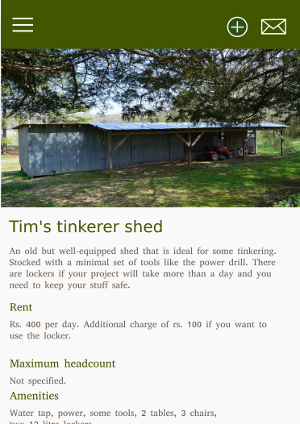
Anyways, my glorious new โ€œstartupโ€ would be called โ€œUse my spaceโ€. Itโ€™s kind of very very similar to Airbnb but different. I wonโ€™t pretend that I came up with an idea that isย nothingย like Airbnb and serves a completely different user base. Thatโ€™s not true.

Gist: you get to rent out soccer ground for a weekend brawl with friends, a rusty old shed for your hardware project e.t.c

Itโ€™s sunday noon and the infinite pool of passion and vigour that I assumed I had to bring my idea to life is seeming to dry up. Iโ€™m already not-optimistic, though not entirely pessimistic. However, I had put together a couple of screens yesterday night to create a UI prototype so that I can pitchto probable co-founders. Oh what a fallacy. Here are the screens. Proof that I was willing to put on the designer hat for the sake of a product.

All screens were made using Inkscape on Ubuntu:

Image attributions:

Assembled a computer

I was without a computer for a whole year. A whole frigging year. And THIS is my reward:

Christened alduin, after the big black dragon from skyrim

Specs

  1. Core i3 6100 @ 3.7Ghz. Skylake.
  2. 8 GB Corsair vengeance DDR4 2133 RAM. Single stick
  3. Zotac GTX 950 Amp! edition. 2GB VRAM. Entry level graphics card.
  4. Adata 120 Gb SSD
  5. Gigabyte GA H110m motherboard. Micro ATX form factor
  6. Antec X1-T cabinet
  7. Cooler Master Storm Devastator gaming combo – backlit keyboard and mouse.
  8. BenQ G2255 21.5 inch monitor. 1920 x 1080.
  9. APC 600v UPS, an extension cord, a used office chair, a really cheap computer table.

And finally, a 60k (INR) hole in my wallet.

But Iโ€™m happy I have a computer and Iโ€™m happy that I could assemble it. Most of the parts were ordered from theitdepot.com with the monitor coming from Amazon.in.

Why I chose to assemble a desktop, as opposed to buying a laptop

I had to live without a computer for almost a year. Why? Because the Nvidia 610m GPU in my Asus k53SD laptop died. No, you canโ€™t replaceย justย the video card. Youย haveย to buy a whole new motherboard because mobile GPUs come soldered to the motherboard. But canโ€™t you just unplug the video card and use the integrated GPU? No. It doesnโ€™t make sense but apparently, thatโ€™s how mobile GPUs work. Did I say that I was asked to pay for a new processor as well? Yeah! Because k53 motherboards have the processor soldered to it. At least thatโ€™s the explanation the repair guy told me. So ordering a cheap motherboard without a graphics card from eBay wonโ€™t work because you canโ€™t pull out the processor from the damaged board and put it in the new board.

Broken hearted, I agreed to pay the price for a new board and a processor – only to find out that it is difficult to source the motherboard because my 2 year old model is outdated.

If that was a desktop, I could have just pulled out the graphics card and everything would have run fine on the iGPU. Everything except the few games I play.

I promised myself that I would never ever buy a laptop as my primary computer again.

Rant ahead

When I assembled my computer, there were very very few laptops with the latest skylake (6th gen) processors inside. This was in February end and almost 5 months after skylake was made available to consumers. Almost all the laptops listed at amazon and other e-commerce sites were running 4th generation processors. However, I did not see any price drops. An ivy bridge core i3 was listed at the same price as a haswell i3 which was listed slightly below the price of a broadwell laptop – and broadwells were rare. I suppose this happens only in India.

So what laptop will 45k Indian ruppees get you? A haswell mobile (mobile processors are always slower than their desktop counterparts) core i5 with 4 gb RAM and no dedicated GPU. If you are lucky you would get an 8GB SSD where windows would be preinstalled. Yes, 8GB. 720p Screen.

Guess how much my assempled pc would have cost sans the graphics card? 42K. And thatโ€™s including the chair and the table.

Hence proved that desktops are more bang for buck if you actually are concerned about performance (A.K.A gaming) and do not mind the lack of portability.

Motherboard refused to power up. By 2.30 A.M I realised that the power connector was loose *sigh*

Pomodoros for Programming

If you’ve never heard of the pomodoro method, go read this. I might have just saved your life. Iโ€™ve been using this neat little technique since college, and now work. Pomodoros for exam prep was easy – you sit in front of the book while the clock is ticking and you go for a walk when it isnโ€™t. But using pomodoros for programming turned out to be slightly more complicated than that. Hereโ€™s what I found:

The Don’ts

  1. Do not use pomodoros for debugging. You cannot estimate when you will figure out what is causing that bug. It can take anything between 2 hours to 2 days.
  2. Do not use pomodoros to set up your dev environment. You can install visual studio and SQL server while wading through nonsense at /r/nonsense. Save up your pomodoros for tasks that actually require focus.
  3. Do not try to do 14 programming pomodoros a day. If you can do 8 a day, fantastic – youโ€™ve done a lot of work. 6 Pomodoros, is good. I think anything more than 8 means you will be staying late in the office. Thatโ€™s okay too. The thing is, manage to tick away more than 6 solid pomodoros despite all the email-replying and chit-chat and gazing-into-the-infinity then it is not a wasted day.
  4. Do not freak out when your pomodoros are interrupted. Instead of losing your shit when people interrupt your pomodoros, avoid interruptions in the first place by setting clear expectations around your maker’s schedule and manager’s schedule

The Dos

  1. Set aside pomodoros for designing systems. This is a good way to force yourself to think hard about a problem before jumping into execution.
  2. Reply to emails on pomodoro breaks. If there are no emails to reply to, take a walk.
  3. Itโ€™s okay to extend your 5 minute break by another 2 minutes. When it comes to personal productivity, it is about following the spirit of the law rather than the letter of the law.
  4. Iโ€™ve never been able to do those 4 pomodoros in a row and take the bigger 15 minutes break. But do not let that stop you from trying things out until you figure out what works for you.
  5. The real reward of using pomodoros is not (just) that you do more work per day, but that you can now measure how much work you do. If you canโ€™t measure it, you canโ€™t improve it.
  6. kanbanflow is a pretty good tool with a built-in timer. Arguably better than pen and paper. But ticking off pomodoros on a big whiteboard is more satisfying.
Estimated 4 pomodoros and did it in 2. What a wonderful day!

Update

After further experimentation with the technique, I have decided that pomodoros for programming are not my cup of tea. There’s nothing wrong with the technique itself – a good friend and co-worker of mine has been using pomodoros (for programming) for almost a year now and he’s happy with it. It’s just that I am not very productive when there’s the threat of a forced break looming on the horizon.

We have moved!

Edit: Nah, I’m back on wordpress. Github pages was simply too much work. I did not need all the custom fancy Js that I thought I’d need after all.

Happy to announce that I’ve moved this blog to lonesword.in

It doesn’t have all the bells and whistles of wordpress. And at times it looks drab and very bare. But it is more me. I designed it (and consequently the consequences), and it is hosted at github.com. That means I can try out changes before I publish and I get to make my site the way I make my code. Yes, the custom domain name is nice to have too ^_^

Web design for programmers : A 10 minutes crash course

I’m not a designer, and I’d rather not be one. However, there are times when programmers who don’t like to design (or draw, for that matter) are forced into that tedious act. I was responsible for designing the front end of a product at a company I interned at for the last 2 months.

Needless to say, html + css was terrifying for me. There were days where I spent entire mornings trying to align the bloody divs. Also, my choice of colors and “ui elements” were not at all pleasing. I had to pull this together somehow. I scoured the web for some intro to design. So here’s what 2 months of front-end taught me :

1. For the love of God, use bootstrap. No matter how promising the control and flexibility of pure css looks, use bootstrap and save the headache – at least when you start out.

2. Use a pen and paper to sketch your design. If you don’t like pens or papers, use a wireframing tool such as wireframe.cc. I spent some considerable time building wireframes, and then threw them away when I changed the design. Lesson learned – use pen and paper. Wireframes are useful when you want a more detailed/accurate layout of your web app.

3. Chances are that you are terrible at choosing colors. Use a tool like paletton to find the right colors, and the right combination of colors.

4. Use good fonts. Microsoft’s Segoe UI is now my favourite font. Segoe UI wasn’t featured in even a single article that discussed the “best free web fonts”. Experiment.

5. Don’t use too many colors, and don’t use too many fonts. Try to keep it simple whenever possible.

6. The official bootstrap docs does not contain references of some really useful bootstrap components like “panel” and “panel-default”. So be sure to double check before you decide that bootstrap doesn’t have it already.

7. You can’t come up with a “mind blowing, innovative, revolutionary design” over night. You might, but chances are that you won’t. Always try to build upon designs (please don’t use templates) that already exist. Here are some useful links for you to ‘build-upon’ :

8. Don’t be afraid to rewrite the HTML. I had to design a signup form and my first implementation sucked. The HTML was a mess and I couldn’t even think of modifying it. So I just wrote that page again, from scratch. Not only did I come up with a wonderful new design and styling (hint: tiles and css shadow on hover), the HTML was much much more readable. Break and build, break and build.

Good luck.

Cohen’s clipping algorithms

Okay this was homework. I searched for a really long time for a javascript implementation of cohen’s clipping algorithms and could find none. Professor said write it in c but its hard to program mouse clicks in c. With javascript, all it takes is a browser.

1. Cohen-sutherland line clipping algorithm in javascript

2. Sutherland-Hodgman polygon clipping algorithm in javascript.

cohen-hogman polygon clipping in action

I believe the code is pretty readable – I had commented lavishly. Save them as html files, open in a browser, and keep clicking left mouse button.

And yes, the implementation is not perfect. I basically drew over the edges in white to “erase” it and that is why you see a very thin line outside the rectangle in the image.

Sound frequencies with aubio

Small python script I wrote so that you can yell at the console and see the frequency on the screen. The results can be slightly wrong (incorrect spikes in frequency occasionally) but it was great yelling at the computer with my hostel mates to see who’s got the highest ‘range’ ๐Ÿ˜€

Link to the github gist.

The code is too small to give an explanation. However, you need to set up a few libraries before running the gist (instructions for linux) :

1. aubio – A fantastic library for analysing audio. Packages libaubio and python-aubio are available in the ubuntu/mint repositories. However, I ran into problems (repos have older versions I guess) and was able to fix them only after compiling the source. So head over to this repo, download the source code, and compile.

To compile aubio, head over to the source directory and type:

./waf configure

That will spew out a list of packages you will need at the end. Make sure you install the dev versions of each package. For example, for sndfile, do

sudo apt-get install libsndfile1-dev


Similarly install all the packages that you would need to use with aubio. I did not have a clue as to what I will need so I installed them all.

Now do ./waf build
and then sudo ./waf install

That should install aubio on your linux system. Time to install the python wrappers. ‘cd’ to /python directory in the aubio source.

python setup.py build to build the files and after building,
sudo python setup.py install to install the python wrappers for aubio


2. The snippet depends on pysoundcard, which is not available in the repos. Head over here to download the source. Build and install this python package the same way you did the aubio python wrappers

Download (or type) the gist and run it! Happy yelling!